Reliable Technology Management for Growing Businesses
Stay Ahead of IT Problems With Managed IT Services
Your business relies on technology every day, but keeping computers, systems, users, and routine IT tasks under control can become difficult as your business grows. StablePoint IT provides managed IT services for businesses across Northern California, giving you ongoing technical oversight without the need to build a full internal IT department.
We work with your existing environment to manage routine IT tasks, monitor systems, address issues, and help keep your technology aligned with the way your business operates.

SERVICE OVERVIEW
What Does Managed IT Include?
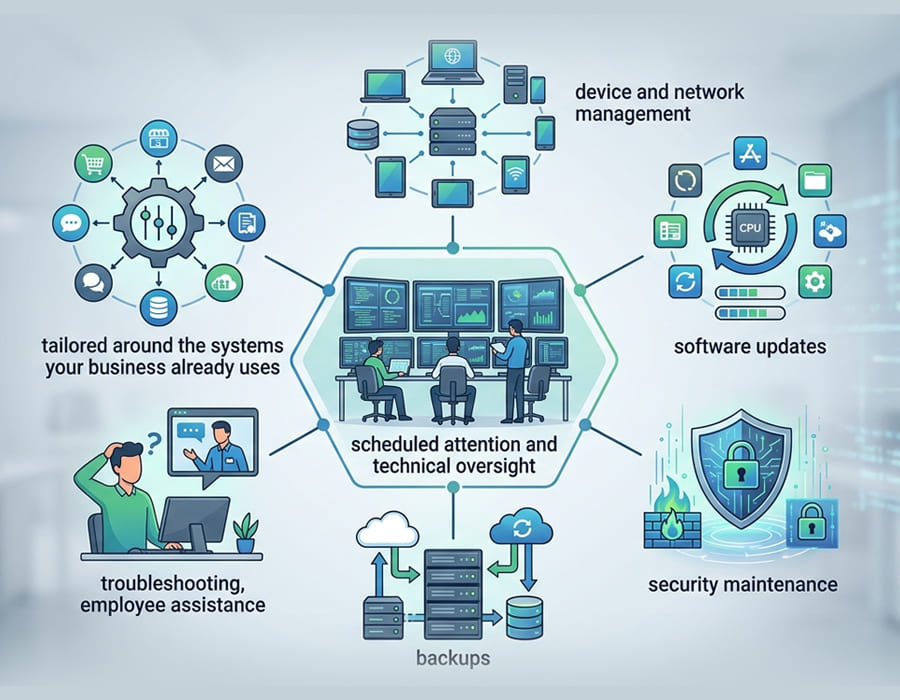
Managed IT services cover the regular work involved in looking after a business technology environment. Instead of waiting for individual problems to appear, your systems receive scheduled attention and technical oversight throughout the year.
Depending on your setup, this can include device and network management, software updates, security maintenance, backups, troubleshooting, and employee assistance. The services can be tailored around the systems your business already uses.
MANAGED IT SERVICES
Is Your Business Ready for Managed IT?
Managed IT may be worth considering when technology issues are becoming a regular distraction or important maintenance tasks are being left until something goes wrong.
- Employees frequently need help with technology
- IT problems keep returning
- Security updates are difficult to stay on top of
- You have more devices or users than you can comfortably manage
- There is no dedicated IT professional on staff
- Your business is adding employees, equipment, or software
- You want someone responsible for keeping routine IT tasks on track
The aim is not to add technology for the sake of it. It is to make sure the systems you already depend on receive the attention they require.
WHAT WE OFFER
What Our Managed IT Services Include

System & Device Management
Business computers and connected devices need regular attention as software, users, and requirements change. We can assist with device management, software support, routine maintenance, and day-to-day technical issues across your workplace.

Network Monitoring
Problems within a network can affect several users at once. We monitor business network environments and help identify connectivity, performance, and other issues that may interfere with normal operations.

Security Updates
Operating systems and business software need to stay current. We can help manage routine updates and security patches so important maintenance does not get overlooked.

Cybersecurity Support
Security is an ongoing responsibility rather than a one-time task. We can assist with security-related maintenance and technology requirements as part of your wider managed IT environment.

Backup Management
Having backups is only useful if they are being maintained properly. We can help manage your backup arrangements and make sure recovery considerations remain part of your ongoing IT planning.

Server Management
Servers require regular maintenance and attention to remain dependable. We can assist with server management, updates, monitoring, and troubleshooting where these systems form part of your business environment.

Help Desk Support
Employees do not always know whether an issue is related to a computer, application, network, or user setting. Managed IT support gives them a consistent place to turn when they need help with everyday technology problems.
A BETTER APPROACH
Why Move From Break-Fix to Managed IT?
| Break-Fix IT | Managed IT |
|---|---|
| Respond when an issue occurs | Monitor and maintain systems regularly |
| Focus on individual problems | Consider the wider IT environment |
| Maintenance is handled when needed | Routine maintenance is scheduled |
| Support is mainly reactive | Potential issues can be identified earlier |
| IT planning happens as required | Technology can be reviewed as needs change |
IT Support That Grows With Your Business
Small businesses don’t always need or want a full internal IT department. As your team grows, however, managing computers, users, software, security, and other technology can become difficult to handle alongside your regular responsibilities.
Managed IT gives your business access to ongoing technical expertise without building an internal IT department from the ground up. As your requirements change, your support can change with them.
CO-MANAGED IT
Already Have an IT Setup?
You do not necessarily need to start over to move to managed IT. StablePoint IT can review an existing environment and determine what is already working, where attention is needed, and which responsibilities should be included in ongoing management.
If another provider or an internal employee currently handles part of your IT, we can also discuss how responsibilities could be divided rather than assuming everything needs to change.
How We Work
A Simple Way to Get Home IT Help How We Start Managing Your IT
01
Review Your Environment
We look at the systems, devices, network, software, and other technology currently used by your business.
02
Identify Priorities
We discuss recurring issues, routine tasks, security requirements, and areas where your business needs consistent attention.
Set the Scope
We agree on the services and responsibilities that make sense for your environment before ongoing management begins.
Manage the Environment
Once everything is in place, we handle the agreed management, maintenance, monitoring, and technical assistance.
FAQ
Frequently Asked Questions
How much do managed IT services cost?
There is no single price for managed IT. Costs can depend on the number of users and devices, your existing infrastructure, the services required, and how much ongoing management you need.
Can managed IT work with our existing software?
In many cases, yes. Managed IT can support the computers, networks, users, and infrastructure that your business software depends on. Application-specific problems may still need to be handled by the software vendor.
Do we still need an internal IT employee?
Not necessarily. Managed IT can handle many responsibilities for businesses without dedicated IT staff. It can also work alongside an existing employee when your business needs additional technical expertise.
How do we move our IT management to StablePoint IT?
The first step is to review your current environment and requirements. From there, we can identify what needs to be documented, transferred, or addressed before ongoing management begins.
What happens when an issue cannot be fixed remotely?
Some problems require physical access to equipment or infrastructure. When remote troubleshooting is not enough, onsite assistance can be arranged where appropriate.